Works with Gmail, Google Workspace, Zoho Mail, Yahoo, and hosted email (IMAP/SMTP with an App Password).
Outreach from a regular inbox is exhausting
Inboxes are built for reading email, not for managing hundreds of prospects.
Prospect status everywhere
Who you contacted, who replied, who agreed — all in a separate spreadsheet that is always out of date.
Forgotten or wrong follow-ups
Most replies come after a follow-up, but remembering each one is impossible. Worse: following up with someone who already replied.
No idea what works
Which campaign gets replies, how much follow-ups contribute, how long prospects take to answer — never measured.
Everything 1-on-1 outreach needs, in one app
Your email stays in your own account. Rocket Posta adds an outreach workspace on top of it.
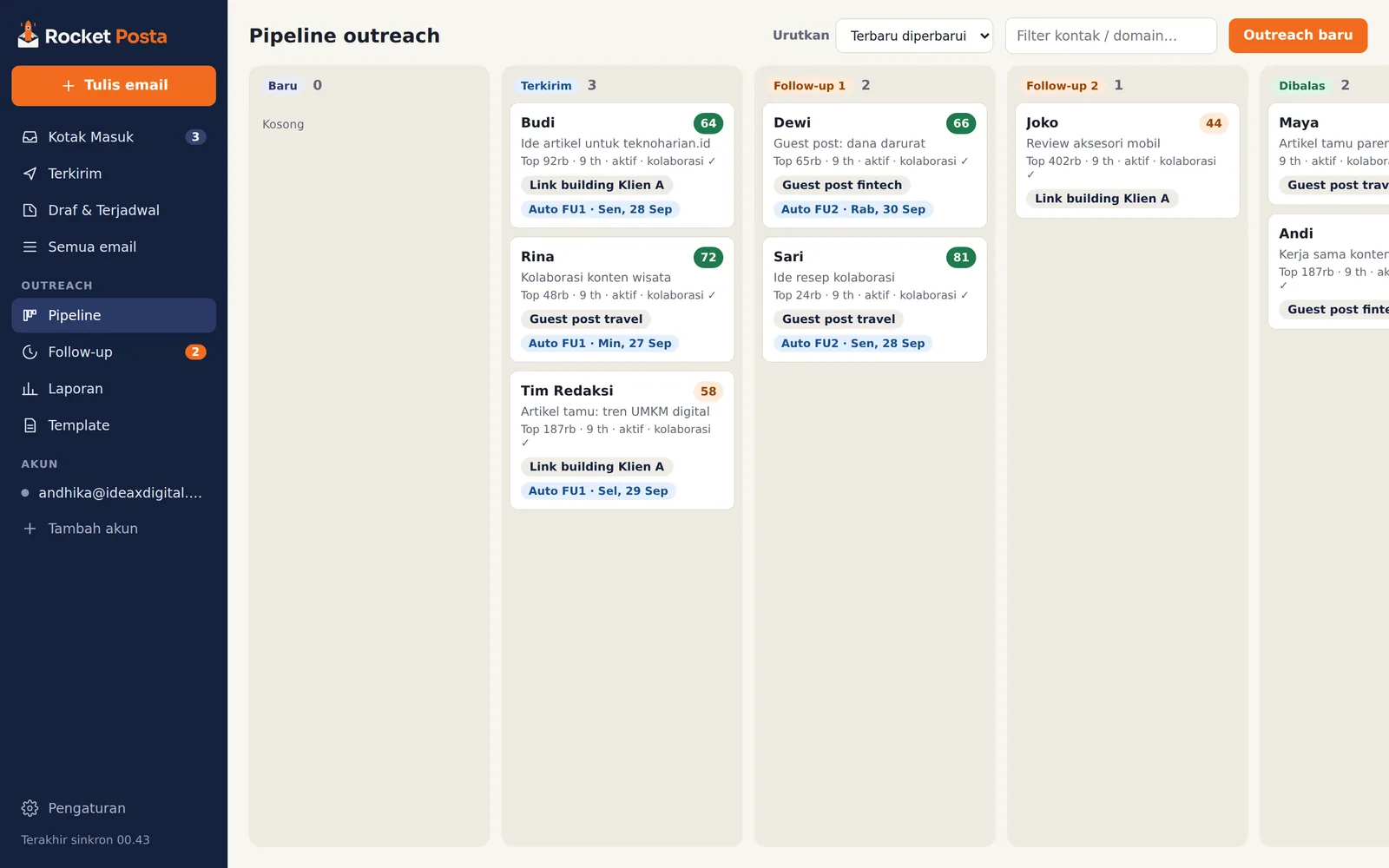
Outreach pipeline
A 7-stage board from New to Deal. Stages move by themselves when you send a follow-up and when a prospect replies.
Domain data card
Popularity (Tranco rank), domain age, publishing activity, write-for-us page, contact emails, and a 0–100 potential score. No API key.
Automatic follow-ups
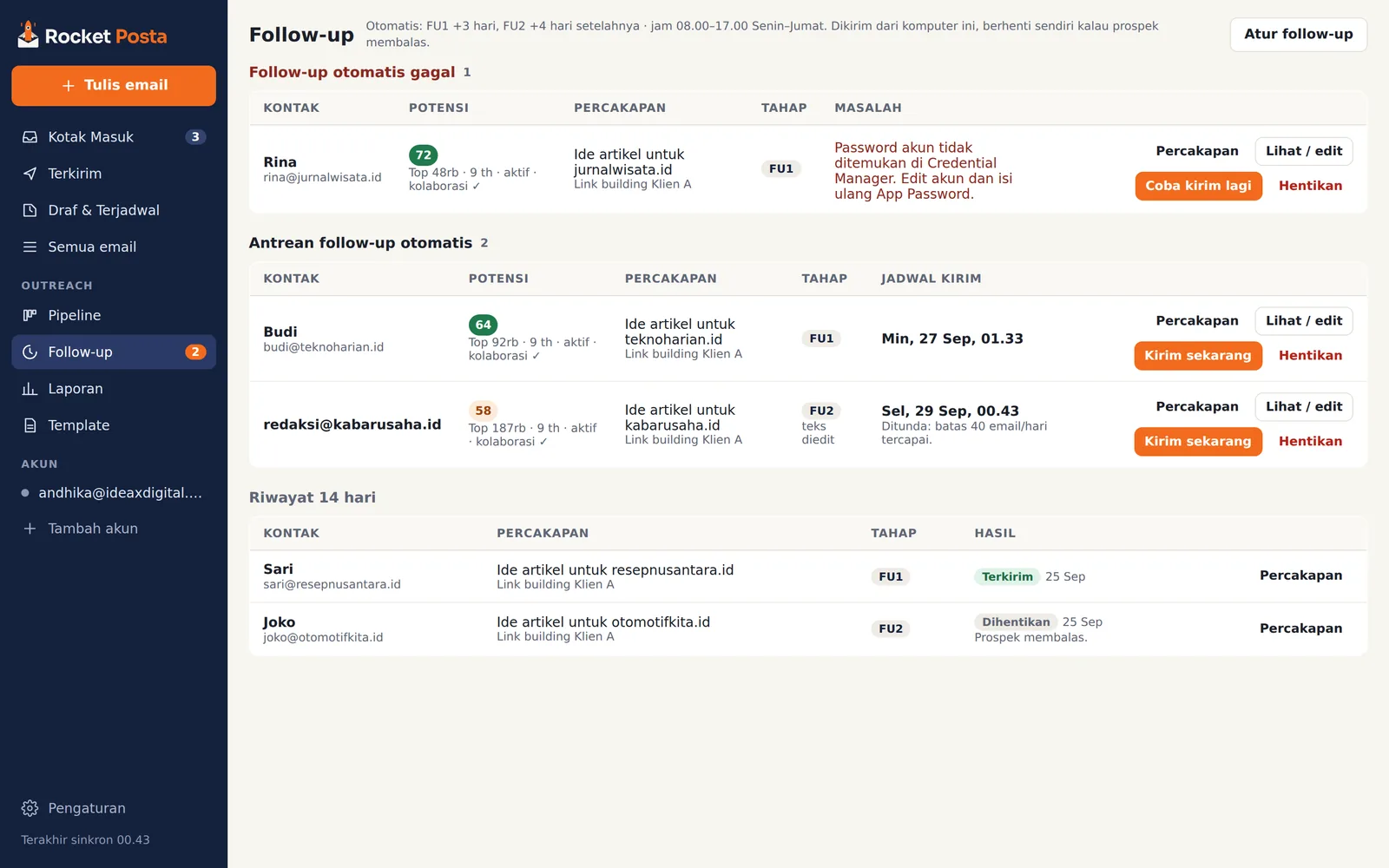
FU1 and FU2 go out in the same thread during working hours, and stop on their own when the prospect replies or the email bounces.
Campaign reports
Reply rate, follow-up contribution, median time to reply, and deals per campaign. Export to Excel for client reports.
Drafts & scheduled send
Drafts save automatically and sync to your server's Drafts folder. Schedule emails for your prospect's working hours.
Sending health
Checks the SPF, DKIM, and DMARC of your sending domain, with ready-to-copy fix records.
Know whether a site is worth pitching before you write
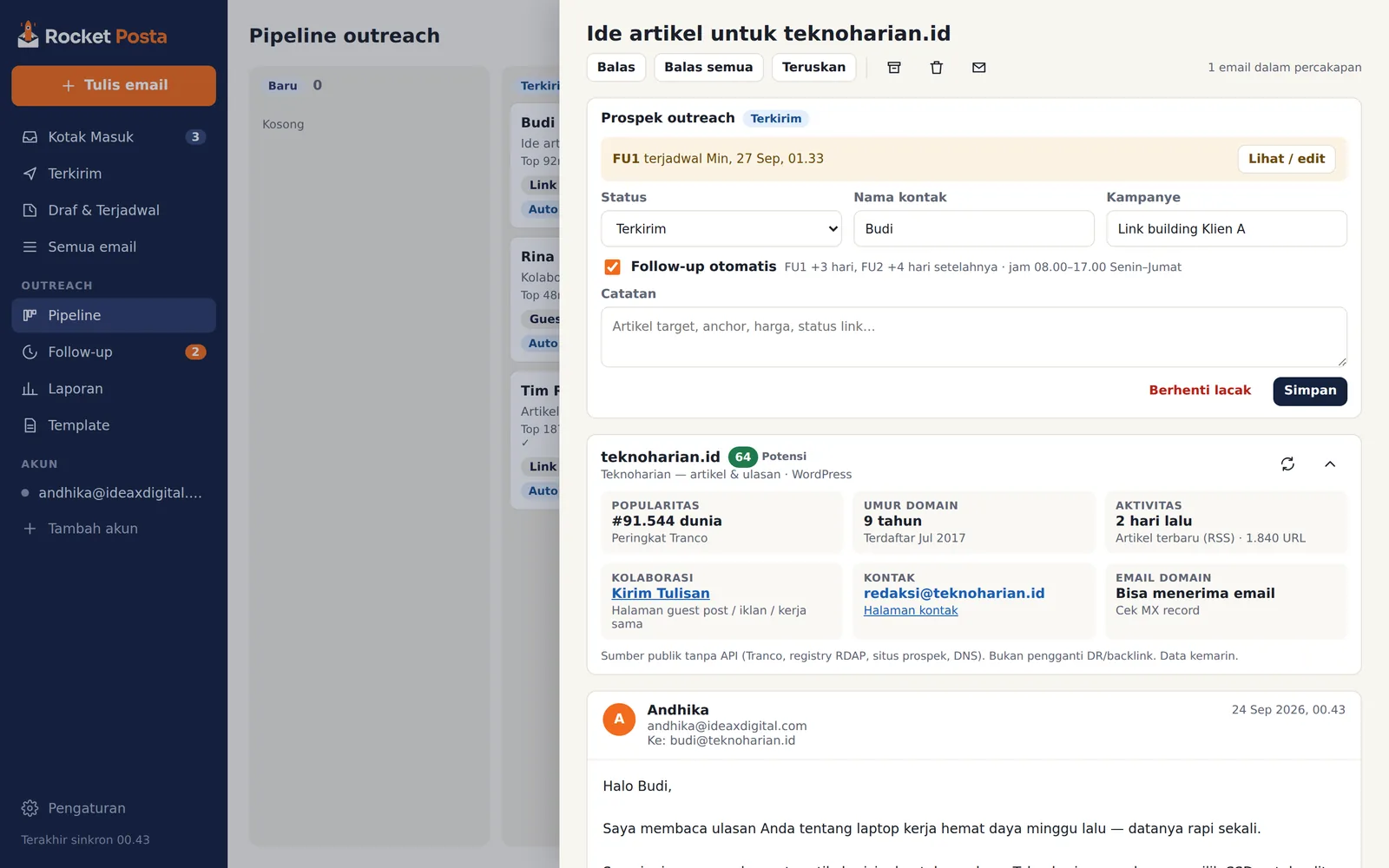
Every conversation shows the prospect's domain card, collected from public sources in seconds.
- Tranco popularity rank and domain age
- Latest post from RSS — is the site still active?
- Write-for-us, guest post, or advertorial pages
- Contact emails on the site, including Cloudflare-protected ones
Data comes from public sources and is not a replacement for DR or backlink metrics from paid tools.
Automatic follow-ups that know when to stop
Tick "Follow-up otomatis" (automatic follow-up) when you send. Rocket Posta handles the rest from your computer.
- Checks your inbox before every follow-up goes out
- Stops when the prospect replies or the email bounces
- Auto-replies (vacation, out of office) don't stop the sequence
- Sending hours, weekends, daily limit, and random gaps are configurable
Follow-ups are sent as replies in the same thread, as plain text.
Reports you can send straight to clients
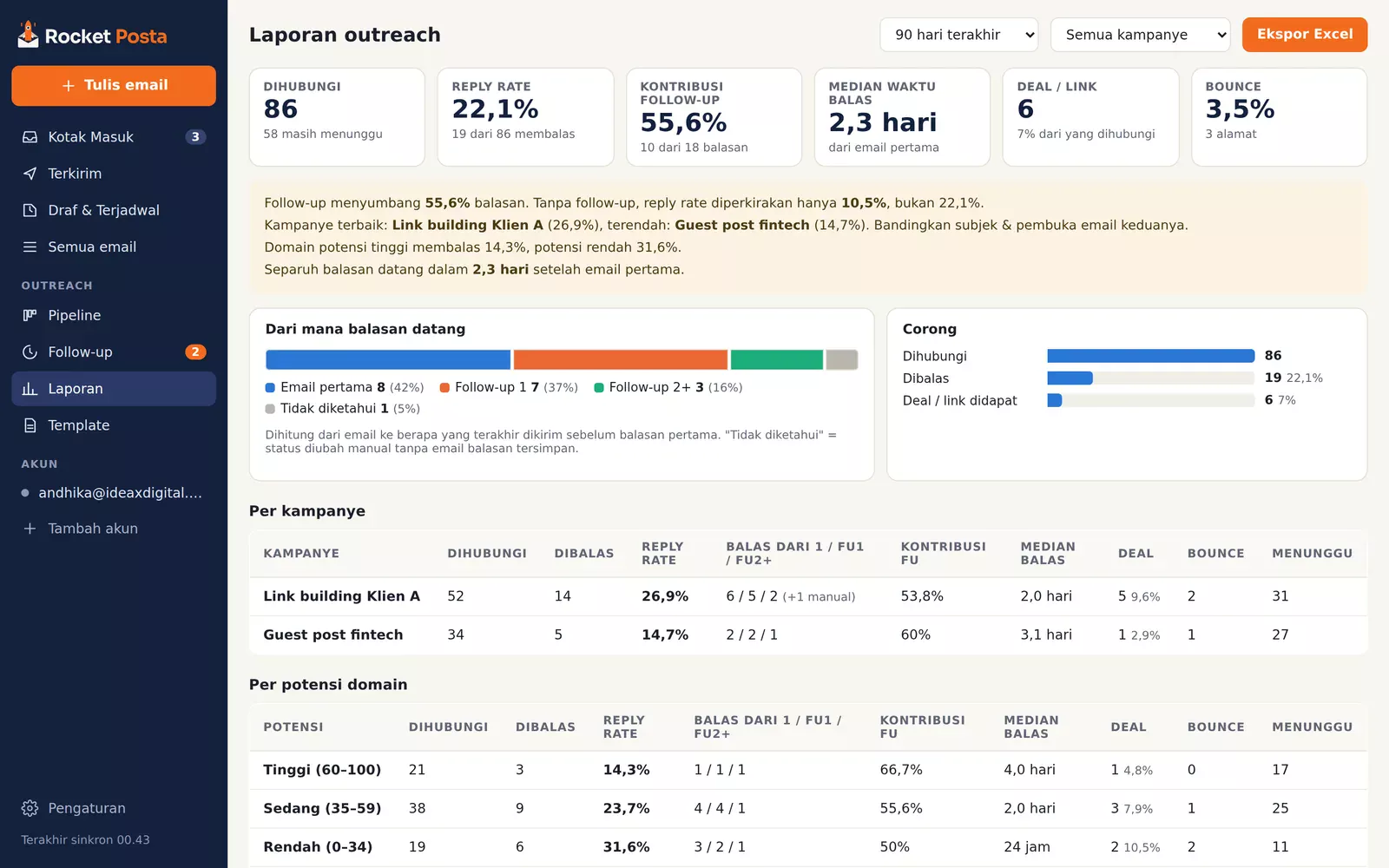
Numbers come from emails actually sent and received, not from statuses typed by hand.
- Reply rate and follow-up contribution per campaign
- Median time until prospects reply
- Performance by domain potential
- Excel export: summary plus one row per prospect
Your data stays on your computer
No Rocket Posta account and no middleman server. Email goes directly between your computer and your email provider.
Stored locally
Emails, prospects, and notes live in a local database on your computer.
Passwords kept safe
App Passwords are stored in Windows Credential Manager, not in the app's files.
No tracking pixels
Remote images are blocked by default, and Rocket Posta never adds trackers to your emails.
Up and running in five minutes
Download and install
A small installer, no admin rights needed. Once installed, Rocket Posta keeps itself up to date.
Add your email account
Pick your provider (Gmail, Zoho, Yahoo, or hosted email), then enter your address and App Password. IMAP/SMTP servers are filled in for you.
Send outreach
Write from a template, tick "Lacak sebagai prospek" (track as prospect) and "Follow-up otomatis" (automatic follow-up), then follow everything in the Pipeline.
7 link building outreach email templates
Ready-to-use templates for guest posts, sponsored post rates, broken links, brand mentions, and follow-ups — plus a follow-up playbook and a deliverability checklist.
- 7 templates + subject line variants
- When and how to follow up
- SPF, DKIM, DMARC checklist
Done!
We've also emailed the guide to you. If it doesn't arrive within a few minutes, check your Spam or Promotions folder.
Open the guide (PDF)Frequently asked questions
Is Rocket Posta free?
Yes. Rocket Posta is free to download and use, with no account and no credit card.
Which email accounts are supported?
Gmail, Google Workspace, Zoho Mail, Yahoo, and hosted email (cPanel and similar) via IMAP/SMTP with an App Password.
Outlook.com and Microsoft 365 mostly reject App Password sign-in, so they are not supported until Microsoft sign-in is available.
Why does Windows show a SmartScreen warning during installation?
The Rocket Posta installer is not yet signed with a code-signing certificate, so Windows warns about an app it doesn't recognize yet. Click More info, then Run anyway.
Every automatic update is cryptographically signed and verified by the app before it is installed.
Can I use it for mass email or mail merge?
No. Rocket Posta is built for personal 1-on-1 outreach. Automatic follow-ups are limited by working hours, a daily cap, and gaps between emails to protect your domain's reputation.
Does Rocket Posta track email opens?
No. Open tracking relies on hidden images that often trigger spam filters. Rocket Posta measures something more useful: who replied, and after which email.
Where does the domain data come from?
From public sources: the Tranco ranking list, domain registries (RDAP) or the Wayback archive, the prospect's RSS and sitemap, and DNS. No paid API key needed.
Does the app need to be running for follow-ups to go out?
Yes, because emails are sent from your computer. Rocket Posta can keep running in the system tray when you close the window, and start automatically with Windows.
Is the app available in English?
Not yet. The Rocket Posta interface is currently in Indonesian (Bahasa Indonesia). Your emails, templates, and reports can be in any language.
Is it available for Mac or Linux?
Rocket Posta is currently available for Windows 10 and 11 (64-bit).
Does Rocket Posta collect my data?
Your email contents and passwords are never sent to us. Emails and prospects stay on your computer; a prospect summary is only sent to your team admin's dashboard if you join Team Mode.
For licensing, the app sends a random installation ID, a computer hash, the app version, and your account emails. Beyond that, we only store what you type into a form yourself. See the privacy policy for details.
Bring order to your outreach today
Download Rocket Posta, add your email account, and send your first outreach in five minutes.
Download free for Windows